
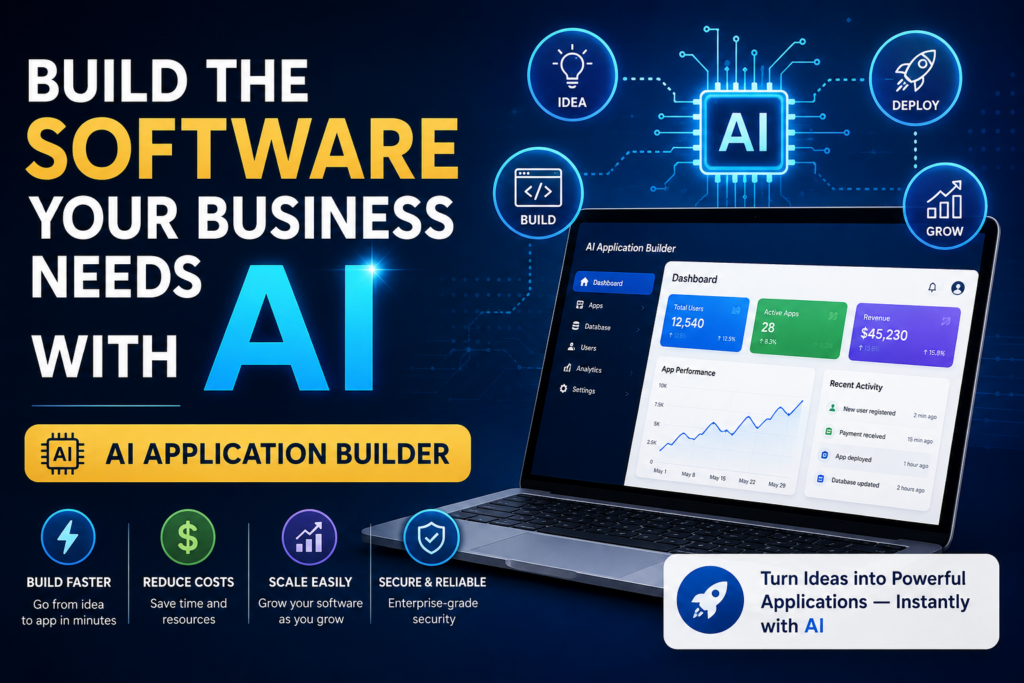
Discover how to build the software your business needs with AI. Save time, reduce costs, and move from idea to application faster.
⏱ 25 min read
Build the Software Your Business Needs with AI
Have you ever looked at a business process and thought, “There has to be a better way to do this”? Maybe the team is juggling spreadsheets, customers are asking for updates manually, or a useful product idea keeps getting pushed back because building the software feels like a project of its own. An AI application builder changes that equation. With the right AI app builder, you can describe the business problem, define the workflow, and turn the idea into working software faster. This guide explores how businesses can use AI app development to create practical applications around the way they actually work.
Key takeaway
- An AI application builder helps businesses turn requirements, workflows, and ideas into working software through AI-assisted development.
- An AI app builder for business can support CRM systems, customer portals, booking tools, dashboards, inventory systems, SaaS products, and other practical applications.
- AI app development can shorten the distance between an idea and a usable first version, making it easier to test, learn, and iterate.
- Platforms like Ndovesha AI combine templates, customization, automation, and deployment to make application development more accessible.
- The strongest results come from starting with a clear business problem, testing the workflow with real users, and improving the application over time.
In this article
- Why Traditional Software Development Is Becoming Too Expensive
- Why Businesses Are Choosing AI App Builders
- How an AI Application Builder Works
- Step-by-Step Guide to Building Software with Ndovesha AI
- Real Business Use Cases
- AI App Builder vs Hiring Developers
- Benefits of AI-Powered Application Development
- Frequently Asked Questions
- Sources & Further Reading
- Conclusion
Why Traditional Software Development Is Becoming Too Expensive
Traditional software development can involve substantial costs, especially when a business is building a new product from the ground up. Beyond implementation, there are planning, project management, infrastructure, testing, maintenance, and change requests to consider. For startups and SMEs, the bigger challenge is often not one individual expense, but the amount of coordination required to keep a software project moving.
Time can be just as important as cost. A software idea may be commercially valuable today, but its impact depends on how quickly the business can test it, learn from users, and improve it. Long development cycles can make even sensible changes feel expensive or slow, particularly when requirements evolve while the application is being built.
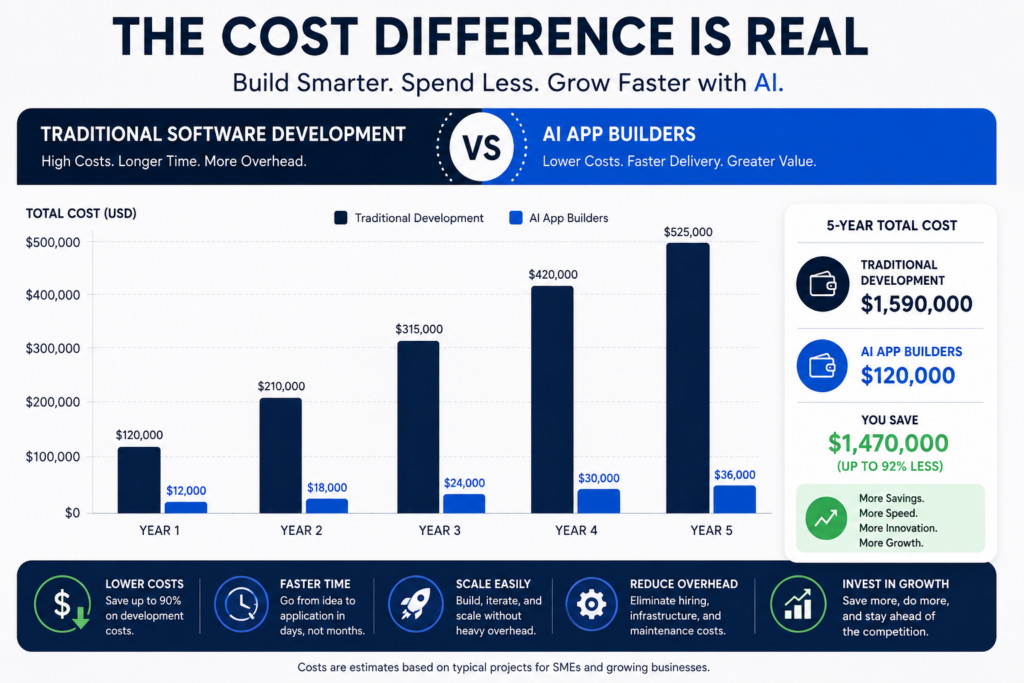
Complex projects can also create friction between the business problem and the software being delivered. Requirements change, workflows evolve, and the first interpretation of a process is not always the right one. The longer the feedback loop, the harder it can be to keep the application aligned with what users actually need.
Why Businesses Are Choosing AI App Builders
AI app builders have emerged as a cost-effective, efficient alternative to traditional software development. These platforms offer numerous benefits:
- Cost Savings: By reducing development overhead and simplifying parts of the software creation process, businesses can manage costs more efficiently. AI app builders typically offer subscription models that make budgeting more predictable.
- Speed: AI app builders enable rapid prototyping and deployment. What traditionally took months can now be accomplished in weeks, allowing businesses to respond more quickly to market demands and opportunities.
- Ease of Use: Designed with non-technical users in mind, AI app builders provide intuitive interfaces that simplify the software creation process. This makes it easier for entrepreneurs and business teams to turn ideas into working applications without deep technical expertise.
Key insight: Over 60% of businesses report reduced costs and faster deployment times with AI app builders compared to traditional development methods.
How an AI Application Builder Works
An AI application builder combines AI-assisted generation with templates, customization, workflow logic, automation, and deployment. Instead of treating software creation as one giant step, the process can be broken into manageable stages that are easier to review and refine.
- Template Selection: Users start by choosing from a variety of templates that suit their business needs. These templates provide a foundation for applications like CRMs, inventory management systems, and customer portals.
- Customization: With drag-and-drop interfaces, users can customize their applications by adding features, altering layouts, and integrating third-party tools — without writing a single line of code.
- Automation: The AI builder automates backend processes, such as data handling and security protocols, ensuring that applications function smoothly and securely.
- Deployment: Once customization is complete, the application can be deployed across various platforms, including web and mobile, with just a few clicks.
A modern AI app platform can also support different levels of application maturity—from a quick prototype to a customer-facing product. The important part is choosing the right starting point and keeping the workflow focused on what users actually need. Ndovesha’s platform currently includes an AI Web App Developer alongside other AI coworkers.
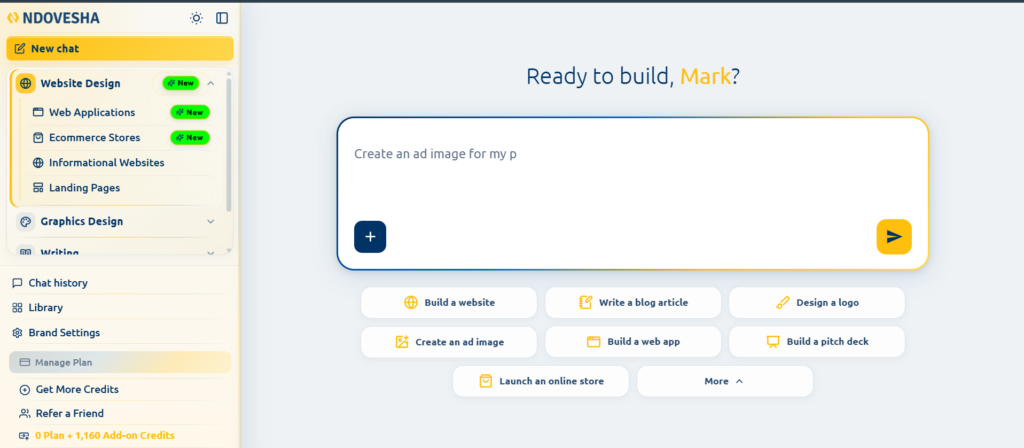
Step-by-Step Guide to Building Software with Ndovesha AI
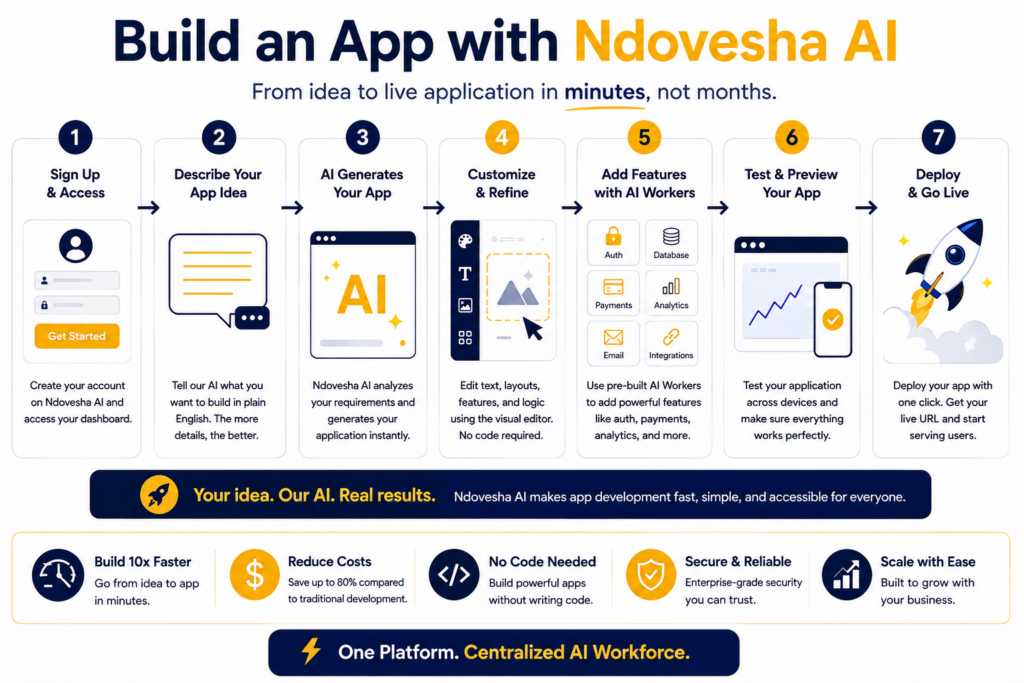
Building an app with Ndovesha AI is designed to be practical and iterative. The idea is simple: build an app with AI, start with the outcome you want, shape the application around the workflow, then test and refine it until it fits the business.
Step 1 — Sign Up
Create an account on the Ndovesha AI platform. This initial step is free and provides immediate access to core features.
Step 2 — Select a Template
Choose a template that aligns with your business needs. Whether it’s a CRM, booking system, or internal dashboard, Ndovesha AI offers a variety of ready-to-use options.
Step 3 — Customize Your Application
Use the drag-and-drop builder to customize your application. Add features, change layouts, and integrate tools to suit your specific requirements — no coding required. For teams evaluating a no-code AI app builder, this kind of visual control can make the first version easier to shape and review.
Step 4 — Automate Processes
Leverage Ndovesha AI’s automation capabilities to handle routine tasks, such as data entry and user notifications, freeing up your time for strategic activities.
Step 5 — Test and Deploy
Once you’re satisfied with your application, test it using Ndovesha AI’s built-in testing tools. After testing, deploy your app with a single click to make it live for users.
For businesses exploring the broader Ndovesha workflow, the same platform can support more than applications. Teams can also explore the AI Website Builder, the AI Landing Page Builder, the AI Blog Writer, and the wider AI Workers ecosystem as part of the same digital workflow.
Real Business Use Cases
The best AI app builder use cases are not abstract technology experiments. They are real business workflows that benefit from better structure, better visibility, and faster execution.
- CRM Systems: Small businesses use an AI business app builder to create custom CRM systems that help manage customer relationships more effectively, without the complexity of traditional software solutions.
- Inventory Management: Retailers and wholesalers can use an AI app maker to develop inventory management systems to track stock levels, orders, and deliveries, optimizing their supply chain operations.
- Customer Portals: Service-based businesses create customer portals to provide clients with a seamless, self-service experience, reducing the need for manual customer support.
- SaaS Platforms: Startups can use an AI software builder to bring SaaS products to market, testing ideas and iterating based on user feedback without heavy upfront investment.
Key insight: AI app builders enable businesses to deploy MVPs (Minimum Viable Products) rapidly, allowing for iterative development and real-time market feedback.
AI App Builder vs Hiring Developers
When comparing an AI app builder with traditional development, the right question is not which approach is universally better. It is which approach fits the complexity, speed, budget, integrations, and level of control your application actually requires.
| Criteria | AI App Builder | Traditional Development |
|---|---|---|
| Cost | Lower initial and ongoing costs | Higher project and technical overhead |
| Speed | Fast deployment and iteration | Longer development timelines |
| Scalability | Easily scalable with business growth | Requires additional technical resources as scope grows |
| Customization | Limited by templates and tools | Highly customizable but more complex |
| Expertise Required | Minimal technical skills needed | Greater technical expertise required |
📷 Image suggestion: A side-by-side infographic comparing AI app builders with traditional developer teams in terms of cost, speed, and scalability.
One of the most important advantages of AI-assisted application development is that it changes where a business can begin. The starting point does not have to be a technical architecture document. It can be a description of a customer journey, an internal process, a recurring operational problem, or a product idea. A business can explain what should happen, who should use the system, and what the desired outcome looks like. That creates a more direct connection between the original business requirement and the application being built.
This is particularly valuable for businesses with processes that are too specific for generic software. See how AI can be used to build digital experiences step by step, then apply the same thinking to business applications. A company may use one platform for communication, another for records, another for scheduling, and spreadsheets for reporting. Each tool may work reasonably well on its own, but the combined workflow can still be fragmented. An application built around the full process can bring those steps together and create a more consistent experience for employees and customers.
AI app builders also make it easier to think in terms of iterations. Instead of trying to define every feature before seeing the first result, a team can create a useful starting point, review it, and decide what matters next. This reduces the pressure to predict the entire future of the application on day one. The first version becomes a learning tool as much as a product.
For business leaders, this means software decisions can be tied more closely to measurable business outcomes. Rather than asking whether a feature sounds impressive, the team can ask whether it reduces a manual step, improves response time, provides better visibility, increases consistency, or makes a customer journey easier. The application becomes valuable because it supports an outcome, not simply because it contains more features.
Good application design still requires careful thinking. AI can generate screens and workflows quickly, but the business must determine what the software should actually do. Clear requirements remain important. Teams should identify the primary users, define the records or information the application must manage, describe the main actions users need to take, and identify the rules that determine what happens next.
Permissions are another important consideration. Different users may need different levels of access. A customer should not necessarily see the same information as an administrator. A sales representative may need access to their own opportunities while a manager may need visibility across the whole team. Defining these roles early helps ensure that the application supports the real operating structure of the business.
Data quality matters too. An application is only as useful as the information it stores and presents. Businesses should think about which fields are required, how information is validated, how records are updated, and which reports or dashboards depend on that data. This is one reason templates and structured application workflows can be useful: they encourage teams to think beyond the visual interface and consider the information architecture behind it.
Integrations can extend the value of an application. A business may need its system to connect with communication tools, payment services, analytics platforms, customer records, or other operational software. When integrations are available, the application can become part of a larger workflow rather than another isolated system. This can reduce duplicate data entry and make it easier to keep important information consistent.
Testing should also reflect real business behavior. It is not enough to confirm that a form submits correctly. Teams should test what happens when information is missing, when a user takes an unexpected action, when a record changes status, or when a different user role enters the workflow. These scenarios help identify edge cases before they become problems for real users.
Usability deserves equal attention. A technically functional application can still fail if users do not understand what to do next. Clear labels, logical navigation, focused forms, useful notifications, and simple dashboards can have a major effect on adoption. AI can help generate these elements, but feedback from real users remains the best way to determine whether the experience feels natural.
There is also a strong case for using AI application builders for internal experimentation. A business may want to test a new approval process, create a reporting dashboard, or explore a different customer workflow without committing to a large long-term project immediately. Building a working prototype creates something that employees can evaluate in practical terms. The business can then decide whether to expand, adjust, or discontinue the concept.
For startups, speed can be particularly important. Businesses exploring AI for their wider digital stack can also see how Ndovesha approaches AI-assisted content workflows alongside application development. Early-stage companies often need to test assumptions before investing heavily in a final product. An AI app generator can help create an MVP with the core workflow required to collect feedback. Teams comparing options can also consider a free AI app builder or trial experience for early experimentation, while checking the limits around deployment, integrations, credits, and commercial use. That allows the team to learn from real users and refine the concept before adding more complexity.
For established companies, the opportunity may be less about replacing existing systems and more about filling gaps. Large organizations often have core systems that handle major processes but still depend on spreadsheets, manual approvals, disconnected forms, and ad hoc reporting for smaller workflows. AI-powered application development can provide a practical way to address those gaps with focused applications.
Agencies can also benefit from this model because software can become part of a broader service offering. Ndovesha also provides AI-powered graphic design and other AI coworkers, making it possible to connect application work with creative execution. An agency working with a restaurant, clinic, school, retailer, or professional service provider may discover that the client needs a specialized portal, dashboard, booking system, or internal tool alongside its existing marketing services. An AI application workflow can make it easier to explore those opportunities and create solutions that are closely aligned with client requirements.
The broader shift is toward software that is closer to the business itself. In practical terms, businesses can create apps with AI around specific processes rather than relying only on generic tools. Instead of selecting a generic product and changing the process to fit it, organizations can increasingly explore applications that reflect their actual operations. This does not mean every workflow needs a custom application. It means businesses have more options when the available software does not fit.
Cost should also be evaluated over the full lifecycle rather than only the initial build. Businesses should consider the time spent coordinating requirements, implementing changes, maintaining workflows, training users, moving information between systems, and adapting the application as needs change. An approach that reduces friction throughout the lifecycle can have greater value than one that only looks inexpensive at the start.
Another important consideration is ownership of the workflow. When business users can participate directly in application creation and refinement, software becomes less disconnected from day-to-day operations. Feedback can move faster from the people experiencing the problem to the people changing the system. That can make continuous improvement a practical part of normal operations rather than a separate technology project.
AI does not remove the need for judgment. In fact, organizations using AI at scale still need clear processes for evaluating risk, security, privacy, and reliability. NIST’s AI Risk Management Framework 1.0 is a useful starting point for that broader discipline. Businesses still need to decide which processes should be automated, which data is sensitive, what security controls are necessary, and which applications justify long-term investment. The technology works best when it is paired with clear business thinking. The goal is not to build more software. The goal is to build software that makes the business work better.
That distinction is important when evaluating AI app builders. A platform should not be judged only by how impressive its first generated screen looks. It should be evaluated by how well it supports the complete workflow: requirements, data, roles, permissions, customization, integrations, testing, deployment, and future changes. The stronger the platform is across those areas, the more useful it becomes as part of a business’s operating toolkit.
Businesses should therefore begin with one clear use case. Choose a process that is important, repetitive, inefficient, difficult to manage, or poorly supported by existing tools. Define the users and desired outcome. Build the first version. Test it with realistic scenarios. Gather feedback. Then decide which improvements are worth making. This creates a disciplined path from business problem to working software.
Over time, several focused applications can become part of a broader digital operating environment. A company may have a customer portal, an internal dashboard, an inventory system, a booking workflow, and a reporting application, each designed around a different need. AI makes it easier to explore this model because the cost and effort required to prototype individual workflows can be lower than the traditional approach.
The practical lesson is simple: software should serve the way the business works. AI app builders create a new path to that outcome by bringing more of the application-building process into a flexible, iterative environment. For businesses that have clear needs and a willingness to test and refine, that can make software a much more accessible part of growth and operations.
Before building an application, it helps to map the process in plain business language. Start with the trigger. What causes the workflow to begin? It could be a new lead, a customer booking, a stock movement, a submitted request, an employee task, or an approval requirement. Next, identify the actions that follow, the people responsible for those actions, and the information that must be captured at each stage. This simple process map gives an AI app builder enough context to generate a more useful first version.
The next step is to identify the minimum useful workflow. Businesses often make software projects more complicated by trying to include every possible feature immediately. A better approach is to identify what users absolutely need to accomplish for the application to deliver value. A booking application, for example, may need customers to select a service, choose an available time, submit their details, receive confirmation, and allow staff to manage the booking. Additional reporting, automation, or integrations can then be introduced once the core experience works.
This principle is especially useful when creating an MVP. The purpose of an MVP is not to make the application incomplete. It is to make the core value clear enough for real users to test. AI can help generate the first version quickly, but the business still decides what belongs in that first version. That discipline keeps the application focused and reduces unnecessary complexity.
Business applications also benefit from clear role definitions. A system may have administrators, managers, employees, customers, suppliers, or other users, each with a different responsibility. Defining these roles helps determine what information each person should see and what actions they should be able to perform. This becomes particularly important as applications move from experimentation into daily operations.
Notifications are another area where AI-powered applications can create useful automation. When a customer submits a request, a team member may need to be alerted. When an order changes status, another user may need an update. When an approval is completed, the next step may need to begin automatically. These small events can add up to significant operational friction when handled manually, making them good candidates for workflow automation.
Reporting should also be considered early. Businesses often build systems that collect data but make it difficult to understand that data. A good application should make important information visible through useful views, filters, summaries, and dashboards. Managers may want a high-level overview, while operational users may need detailed records. Designing these views around specific decisions can make the application much more valuable.
Search and organization become increasingly important as the amount of information grows. Users should be able to find records quickly, understand their current status, and move between related information without unnecessary navigation. AI-generated interfaces should therefore be reviewed from the perspective of everyday use. A screen that looks clean in a demonstration may still be frustrating when an employee needs to use it dozens of times each day.
Another important consideration is the relationship between the application and existing tools. Businesses rarely operate from one system. The best AI application development workflows acknowledge that reality and connect the new application to the tools the business already relies on. They may already have customer records, accounting software, communication channels, payment services, analytics tools, or other platforms. An AI application builder should therefore be evaluated not just on what it can create in isolation, but on how well the application can fit into the existing technology environment.
Businesses should also think about what happens after launch. For broader guidance on Ndovesha capabilities, workflows, credits, and platform usage, see the Ndovesha FAQ. Users will discover new requirements. Management will request additional reporting. A customer may ask for a new self-service option. The business may introduce a new product or service. A useful AI app builder should make iteration practical so that the application can evolve rather than becoming a static project that quickly falls behind the business it was designed to support.
Continuous improvement can be organized around feedback. Collect comments from users, review where people abandon or work around the process, and identify steps that still create manual effort. Prioritize changes according to business value. This creates a feedback loop in which the application becomes more closely aligned with actual operations over time.
There is also an important difference between building software and simply automating a task. When the workflow touches multiple users, records, and actions, it can also make sense to explore Ndovesha’s AI Workers as part of the wider operating workflow. A single automation may solve one repetitive action, but an application can provide a complete experience around a process. It can hold the records, guide users through the workflow, manage permissions, trigger automations, produce reports, and provide a central place for the business to operate. AI app development software makes it easier to consider the whole process rather than isolated tasks. The broader AI-assisted development ecosystem also includes tools such as GitHub Copilot, which demonstrates how AI can support coding, planning, and software-development workflows.
This broader perspective can help businesses decide when an AI application is appropriate. If the problem is a single repetitive notification, a simple automation may be enough. If the problem involves multiple users, records, decisions, approvals, and reporting, an application may be a better fit. The goal is to match the technology to the problem rather than adding technology for its own sake.
As businesses become more comfortable with AI-assisted development, the application-building process can become part of normal product and operations planning. New ideas can be explored as working prototypes. Existing processes can be digitized incrementally. Departments can create focused tools around their highest-value workflows. This makes software development less of a once-in-a-while initiative and more of an ongoing capability.
Benefits of AI-Powered Application Development
AI-powered application development can create advantages that compound over time. Once a business has a working application, it can keep refining the workflow, automating repetitive steps, and extending the system as new needs emerge.
- Automation: Automates repetitive tasks, reducing manual workload and increasing overall productivity.
- Scalability: Easily adapts to growing business needs without the need for extensive reconfiguration or new hires.
- Accessibility: Opens up possibilities for non-technical users to innovate and contribute meaningfully to software development.
- Cost-Effectiveness: Reduces the financial burden of software development, making it accessible to startups and small businesses at every stage.
Key insight: AI-powered apps can scale alongside your business, offering long-term flexibility and sustained cost savings.
FAQs
What is an AI app builder?
An AI app builder is a platform that uses artificial intelligence to help businesses create applications through prompts, templates, visual configuration, automation, or a combination of these methods. An AI app creator can turn business requirements into an initial working experience that teams can then review and refine.
How does an AI application builder save costs?
AI application builders can reduce costs by lowering development overhead, simplifying parts of the build process, and reducing the time required to bring applications to market. Subscription-based pricing models can also make budgeting more predictable.
Can AI app builders handle complex applications?
Yes, AI app builders are capable of handling complex applications. While they are ideal for MVPs and small to medium-sized applications, many platforms are expanding their capabilities to support more intricate projects.
What industries benefit most from AI app builders?
Industries such as retail, healthcare, education, and finance benefit significantly from AI app builders due to their need for scalable, cost-effective, and rapidly deployable solutions.
How secure are AI-built applications?
Security should be evaluated carefully with any application. NIST’s AI Risk Management Framework provides a useful reference for thinking about trustworthiness and risk management across AI systems. Businesses should review how an AI app platform handles data, authentication, permissions, backups, integrations, and governance, especially when the application will manage customer, financial, operational, or other sensitive information. For a security-focused perspective, OWASP’s Artificial Intelligence Security Verification Standard provides testable security requirements for AI-enabled systems.
Sources & Further Reading
These resources provide additional context on AI-assisted software development, responsible AI, and security practices:
- HubSpot Blog — Offers insights into how content marketing impacts business growth.
- Wikipedia — Content Marketing — Provides a comprehensive overview of content marketing principles.
- NIST AI RMF Playbook — Practical guidance for incorporating trustworthiness considerations into AI design, development, deployment, and use.
- OWASP AI Exchange — Practical guidance and references for AI security and privacy.
- NIST AI Resource Center — Resources for testing, evaluation, verification, and validation of AI systems.
Ultimately, the value of AI application development comes from connecting technology to a real business outcome. A useful application can make work easier to manage, give customers a clearer experience, provide leaders with better visibility, and create a foundation for new services. The strongest results come when teams combine clear requirements with rapid experimentation and disciplined refinement.
That is why building the software your business needs with AI should begin with the business itself. Start with the process, the users, the information, and the outcome. Then choose the application structure, generate the first version, test it in realistic conditions, and improve it based on evidence. This approach keeps the technology practical and ensures that the application grows in step with the needs of the organization.
For businesses planning their next digital initiative, this also creates a useful decision framework. You can also compare how Ndovesha approaches AI-powered execution in What Makes a Great AI Marketing Platform in 2026. Look for processes where better software could improve visibility, consistency, customer service, speed, or control. Prioritize the workflow where the improvement would matter most, build a focused first version, and evaluate the result with the people who will actually use it. That keeps application development grounded in practical business value.
In this way, AI becomes part of the business-building process itself: a practical capability for turning ideas, requirements, and operational knowledge into software that can be tested, improved, and used. The result is not simply a new application, but a better way to build and improve business systems.
Conclusion
AI app builders are changing the way businesses approach software development. An AI app builder for business can help teams move from an idea to a working application faster while keeping the focus on real operational needs. Whether you are testing an MVP, improving an internal workflow, or building a customer-facing product, the opportunity is to create software that fits the business instead of forcing the business to fit the software. Explore Ndovesha to see the available platform capabilities.